
2026-27 Benefits Open Enrollment—Frequently Asked Questions
Open Enrollment: May 20–June 3, 2026 | Coverage Effective: July 1, 2026
This FAQ applies to all benefit-eligible employees. The General FAQs apply to everyone. Group-specific FAQs follow for the Union of Pitt Faculty, the Staff Union of Pitt, and All Other Employees.
Questions? Contact OHR Benefits
Phone: 833-852-2210 | Monday–Friday, 8:30 a.m.–5:00 p.m. ET
Online: Submit a request at hr.pitt.edu/contact-ohr. Select "Benefits" then "Open Enrollment."
Open Enrollment website: openenroll.hr.pitt.edu
EVA: Try OHR’s virtual assistant EVA for quick benefits questions. When asking, include your position (i.e., Full-Time Regular Staff) and employment group (Union of Pitt Faculty, Staff Union of Pitt, or All Other Employees) so EVA can give you the right answer. Note: EVA is still learning, so please verify any answer with OHR Benefits before acting on it. The University is not liable for inaccurate information provided by EVA.
General FAQs: Open Enrollment Basics
Open Enrollment runs from Wednesday, May 20, 2026, through Wednesday, June 3, 2026, at 11:59 p.m. ET. Any elections or changes you make will be effective July 1, 2026, through June 30, 2027*.
*Coverage goes through the end of the plan year unless you experience an IRS qualifying life event or experience a change in employment impacting eligibility for benefits.
All enrollment changes are made in Pitt Worx, the University's HR and payroll system. Log in via my.pitt.edu beginning May 20, 2026. You will not be able to make changes before that date. Step-by-step instructions are available on the Pitt Worx Hub.
No action is required if you are satisfied with your current elections; they will automatically carry over to the new plan year starting July 1, 2026. However, we strongly encourage you to review your elections and dependent information during Open Enrollment.
To ensure consistency and equitable treatment of all employees, the Open Enrollment deadline (June 3, 2026) is firm. The University communicates Open Enrollment through multiple channels in advance: email reminders, Pitt Worx system notifications, the OHR website, and live and recorded information sessions, so every employee has the opportunity to review and submit elections on time. If you miss the deadline or your required dependent documentation is not received by June 3, your next opportunity to make a change will be the 2027-28 Open Enrollment period (coverage effective July 1, 2027), unless you experience a qualifying life event (such as marriage, divorce, birth, adoption, or loss of other coverage) or a change in your employment status that affects benefit eligibility.
Qualifying life events include marriage, divorce, birth or adoption of a child, gain or loss of coverage and more, allowing you an opportunity to make changes to your benefits. You have 60 days from the event date to report the life event to the benefits department, submit required supporting documentation and to submit your benefit changes in Pitt Worx.
No. If you are hired during the Open Enrollment window, you will not have a separate Open Enrollment opportunity. The elections you make through your new-hire benefits enrollment, including medical, dental, vision, life insurance, and FSAs, automatically carry over into the 2026-27 plan year (July 1, 2026–June 30, 2027). To change those elections after the new plan year begins, you would need to wait for the next Open Enrollment or experience a qualifying life event, or a change in employment impacting eligibility.
Yes. No matter what your union status is, you are eligible to participate in Open Enrollment if employed in a benefits-eligible role.
No. Active employees and their covered dependents are not required to enroll in Medicare when they become eligible due to age, and you do not need to waive Pitt's coverage. While you remain actively employed at Pitt, your University-sponsored medical plan stays primary. Specifically:
- Medicare Part A: You should apply online at age 65, even while still working, because Part A is premium-free.
- Medicare Part B: You can delay Part B while you are actively employed and covered under a Pitt medical plan. There is no late-enrollment penalty as long as you have employer coverage.
At retirement: One to two months before your retirement date, the OHR Benefits Department will provide an Employer Verification Form to mail with your Medicare Part B application to your local Social Security office. This form documents your employer coverage so you avoid a late-enrollment penalty. You can apply for Part B during the special enrollment period that runs from 3 months before your retirement date.
For more information, visit socialsecurity.gov, medicare.gov, or the Medicare Counseling PA MEDI Program for free Medicare counseling.
Important note for HSA participants: enrollment in any part of Medicare (including Part A) makes you ineligible to contribute to a Health Savings Account. If you are enrolled in the Panther HDHP with HSA and are approaching 65, contact OHR Benefits before enrolling in Medicare to discuss your options.
General FAQs: Enrollment Process and Pitt Worx
Log in to my.pitt.edu, search for and open Pitt Worx, and sign in via Pitt Passport. From the "Me" page, select Benefits, then Your Benefits. Scroll to the Enrollment Summary section to review your current elections and select View all enrollments to see your full benefits lineup.
Beginning May 20, log in to Pitt Worx, navigate to Benefits, and select Enroll Now. In the Before You Enroll section, select Choose how you want to enroll, verify the Discovery journey is selected, and click Continue. Review your dependents, follow the on-screen prompts, and click Submit before the June 3, 2026, deadline. You can make changes as many times as needed during Open Enrollment. Only your final submission counts. Detailed enrollment instructions can be found on the Pitt Worx Hub.
Yes, here's how:
To add a new dependent:
- Add them in the Before You Enroll section of Pitt Worx.
- Upload required documentation (e.g., marriage certificate, birth certificate) in Document Records before completing your elections.
- You will not be able to submit changes unless dependents are added and documentation has been uploaded.
To remove a dependent:
- Do NOT edit/delete them from your contact list yourself — only Benefits Administrators may do so.
- Update your elections during Open Enrollment and uncheck them from your plan selection.
- If you would like to see their name removed from the contact list, please contact the benefits department at 833-852-2210 or submit an inquiry online.
From the Benefits section of Pitt Worx, select Document Records, then click + Add. Choose the appropriate Document Type from the dropdown, enter the dependent's name in the Name field, upload the document in the Attachments section, and click Submit. Leave the Context Value field blank. Repeat for each dependent.
Open Enrollment is a great time to review your emergency contacts. Log in to Pitt Worx and follow the Adding or Editing an Emergency Contact Quick Reference Guide on SharePoint for step-by-step instructions. Please note: Updating your contacts is not equal to updating covered dependents for insurance. To update your covered dependents for insurance purposes, you need to complete the entire enrollment process. Detailed enrollment instructions can be found on the Pitt Worx Hub.
A Pending Action Item means you have an Open Enrollment task to review in Pitt Worx. You may see this even if you don't plan to make changes. Review your elections and click Submit to confirm them and clear the action item. Simply viewing your elections does not clear it. Pending actions can also include EOI requirements for life insurance increases or selecting a Primary Care Physician/Primary Dental Office.
Saving a confirmation of your elections is strongly encouraged; it can serve as proof of enrollment if needed. Log in to Pitt Worx via my.pitt.edu, go to Benefits, scroll to Enrollment Summary, change the dropdown from Current enrollment to As of Date, set the date to 7/1/2026, click View Enrollments, and then click Print All Benefits in the top right to download your confirmation.
Pitt Worx does not send a confirmation email when you submit your elections. To verify your submission and keep proof for your records, log in to Pitt Worx, go to Benefits → Enrollment Summary, change the dropdown from Current enrollment to As of Date, set the date to 7/1/2026, click View Enrollments, and review your elections. Click Print All Benefits in the top right to download a copy. Save this confirmation — you will need it if you experience a qualifying life event and want to enroll in or cancel coverage outside of Open Enrollment.
Yes. The following benefits are managed outside Pitt Worx:
- Supplemental & Voluntary Benefits (MetLife Supplemental Medical Coverage, MetLife Legal Services, etc.): Enroll directly at pittperks.com.
- Retirement Savings (TIAA): Manage your elections in the TIAA portal (search “TIAA” on my.pitt.edu).
Coverage for a domestic partner requires an approved Affidavit of Domestic Partnership before you can add your partner in Pitt Worx. Plan ahead, the Affidavit must be approved by OHR before the end of Open Enrollment (June 3, 2026) for coverage to take effect July 1, 2026.
Steps:
1. Complete and notarize the Affidavit of Domestic Partnership and gather the supporting documentation showing the partnership meets the University's eligibility criteria.
2. Submit the Affidavit and supporting documentation to the OHR Benefits Department. Allow time for review.
3. Once approved, add your domestic partner to the People to Cover section in Pitt Worx and upload the processed Affidavit in Document Records.
4. Complete your Open Enrollment elections in Pitt Worx by June 3, 2026.
Note: If a prior Affidavit was submitted and not approved, a new notarized Affidavit is required. The Affidavit form, eligibility criteria, and the full list of required supporting documentation are on the Domestic Partner Benefits page. Allow time for review. If a prior Affidavit was submitted and not approved, a new notarized Affidavit is required.
The University follows IRS guidance on the taxation of domestic partner benefits, which results in two tax differences compared to spousal coverage:
- After-tax employee contribution. Your share of the premium for domestic partner coverage is deducted on an after-tax basis, rather than pre-tax, as it is for a spouse.
- Imputed income on the University's contribution. The value of the University's contribution toward your partner's coverage is added to your gross wages for federal income tax, Social Security, and Medicare tax purposes — even though you are not paid that amount. Imputed income appears on your pay slip and on your W-2.
Spouses (including same-sex spouses) are not subject to imputed income because federal law recognizes the marriage. The tax impact of domestic partner coverage can be significant depending on your individual circumstances; you are advised to consult your own tax counsel before electing this coverage. Detailed examples and a sample pay statement are available on the Domestic Partner Benefits page.
General FAQs: What's New for 2026-27
The following changes apply to all benefit-eligible employees, except where noted, effective July 1, 2026, regardless of employment category or role. Additional changes may apply based on your union status and bargaining unit. Visit openenroll.hr.pitt.edu and select your role/status category for plan options, rates, documents, and enrollment instructions.
Prescription drug coverage administration transition to CVS Caremark.
Coverage previously administered by Express Scripts (ESI) will transition to CVS Caremark. While CVS Caremark will be the University’s new pharmacy benefits manager, individuals may choose to use a CVS pharmacy or continue using one of the thousands of other participating pharmacies in the CVS Caremark network.
There will be no changes to prescription copays, but the change will allow access to broader benefits. All individuals who participate in a University-sponsored medical plan will receive a new UPMC medical insurance card in late June with the CVS Caremark information listed. Please ensure that you and any covered dependents use your new cards beginning July 1, 2026.
➤ Learn more about your prescription drug benefit through CVS Caremark
Medical plan names are being simplified.
The plan designs are not changing — only the names:
Current Plan Name | New Plan Name |
|---|---|
Panther Gold HMO | Panther HMO |
Panther PPO | Panther PPO |
Panther Basic HDHP with HSA | Panther HDHP with HSA |
Life insurance administration transition to Securian Financial.
Coverage previously administered by The Hartford will transition to Securian Financial. Your coverage amounts stay the same, and premiums for optional life insurance and accidental death & dismemberment are decreasing. Spouse/domestic partner/dependent child life insurance rates will remain the same.
Special Open Enrollment Opportunity for Optional & Dependent Life Insurance
Optional Life Insurance: Employees may elect coverage up to the guaranteed issue limit of the lesser of three times their annual earnings or $500,000 during this Open Enrollment period without having to complete Evidence of Insurability (EOI). EOI is medical information that is typically required before coverage is approved.
Dependent Life Insurance: Employees may elect spouse/domestic partner coverage up to the guaranteed issue limit of $75,000 without EOI if elected during this Open Enrollment period.
➤ Learn more about your life insurance benefit through Securian Financial
Health Savings Account (HSA) Seeding* for the High Deductible Health Plan (HDHP)
Starting this next plan year, if you currently have or elect the Panther HDHP with an HSA, to help defer costs and align with market standards, the University will provide a once-per-plan-year “seeding” contribution into your HSA of $500 if you have individual coverage or $1,000 if you have dependents on your plan.
* Not available to all employees. If you are covered by a collective bargaining agreement (union contract) or within a collective bargaining unit, please consult your agreement or contact your union representative to confirm eligibility. Not available for postdoctoral scholars, temporary employees, or those with a BMS-managed enrollment.
Premium changes for the 2026-27 plan year vary by employee group. Some groups may see a medical premium increase only, while others may not at this time if they are in active collective bargaining. Visit openenroll.pitt.edu for the rates that apply to your group. There are no plan design changes for medical, as well as no plan design or premium changes for dental or vision, for the 2026-27 plan year.
Rising costs are being driven by a combination of complex factors, many outside the University's control, including economic, demographic, systemic and policy-related issues such as:
- National inflation
- Federal changes
- Rising prescription drug costs
- Aging workforces
- Prevalence of chronic conditions
- High utilization of care
- Technological advances.
Please see the chart below for claims data for plan years 2018-19 through 2025-26.
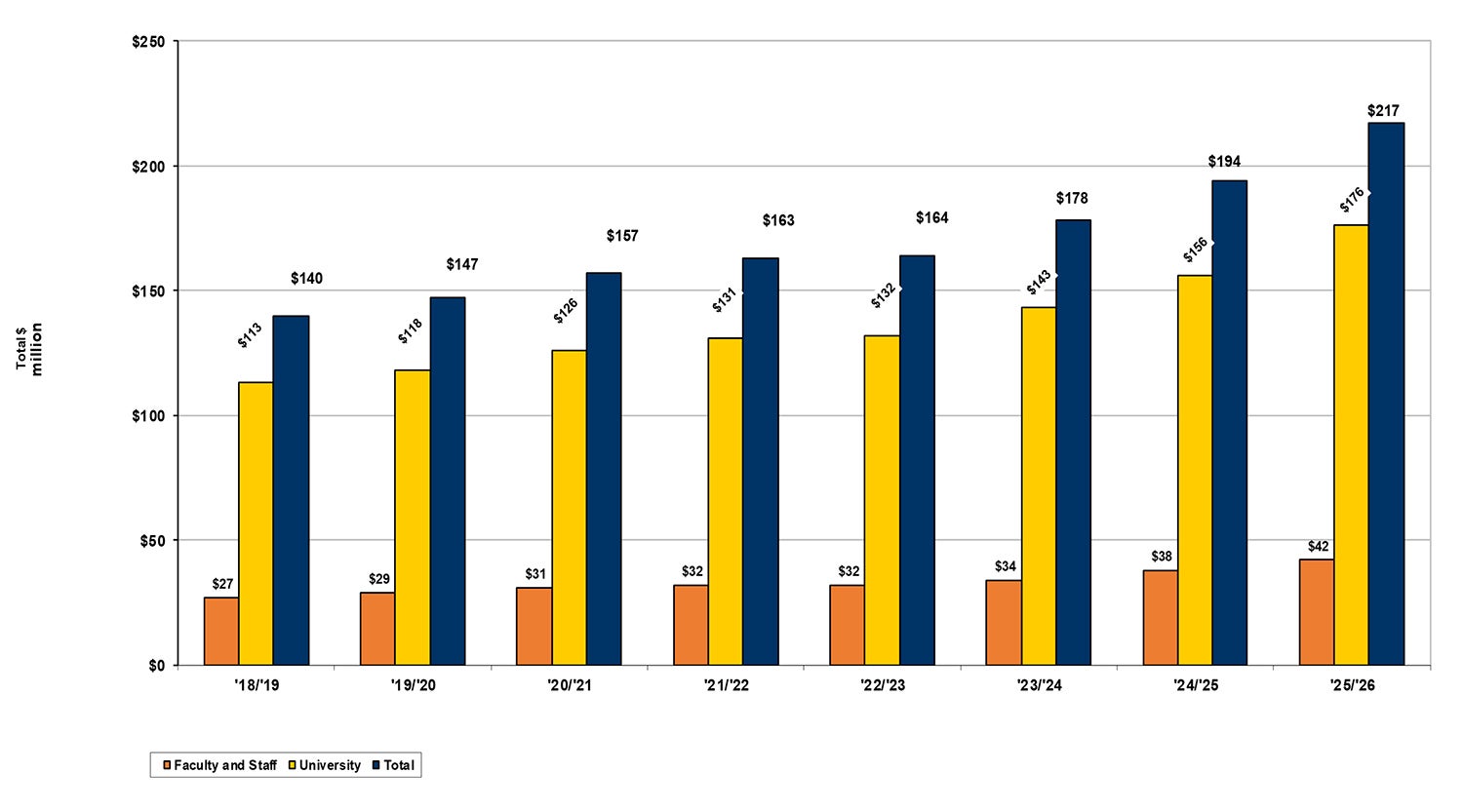
The University has on average 16,000+ benefit-eligible employees. The University's total covered lives include active faculty and staff, post-doctoral associates, post-doctoral scholars, research associates, pre-65 retirees, Long Term Disability, Workers Compensation, COBRA participants, spouses, domestic partners, and dependent children covered under the plans.
Premium rates are set based on the prior year's claims experience, plus assumed inflation based on actuarial data and administration service fees (ASO). The University's largest cost driver is prescription drugs, making up 33% of total spend.
The University utilizes external consultants and actuaries to assist with determining the necessary changes to plans in order to remain competitive and reduce premium increases. The University also uses benchmarking from employers across the US to compare our plan designs and costs. However, there are no plan design changes for medical, dental, or vision for the 2026-27 plan year.
The premium costs that Pitt employees pay are far lower than those of comparable employers in the market, based on benchmarking across the U.S. The University continues to be below the market average for premium costs associated with our sponsored medical plans.
Employee benefit eligibility varies based on employment classification. Coverage for represented employees is governed by their collective bargaining agreement (CBA). The University must offer benefits that meet the requirements of the CBA for each group, including premium increase caps, plan design provisions, etc.
General FAQs: Prescription Drug Coverage with CVS Caremark
Copayments will remain unchanged, and only minimal adjustments to the formulary are anticipated. The change in pharmacy benefit administrator will provide access to enhanced features, including thousands of in-network pharmacies. While CVS Caremark will be the University's new pharmacy benefit manager, individuals may choose to use a CVS pharmacy or any other participating pharmacy in the CVS Caremark network. To find participating pharmacies, visit the CVS Caremark Microsite.
Those enrolled in a University-sponsored medical plan through UPMC Health Plan will continue to have prescription drug coverage included in their medical election and premium. However, inquiries and questions about prescription drugs will need to be directed to CVS Caremark. Customer service can be reached at 833-296-1891. Members can also access plan details and prescription information by logging in to Caremark.com, either by creating an account or by accessing the SSO portal on my.pitt.edu. However, during Open Enrollment, all of that information is available on the CVS Caremark Microsite.
Moving to CVS Caremark gives Pitt employees a larger pharmacy network, expanded medication coverage, and stronger pricing on brand-name and specialty drugs. The change is designed to keep your prescription benefits competitive while helping the University manage costs over time.
CVS Caremark operates one of the largest retail pharmacy networks in the country, with thousands of in-network locations nationwide. Most major chains and many independents participate, including:
- CVS Pharmacy locations
- Giant Eagle, Target, Walmart, and Costco
- Local independents, including Falk Pharmacy and University Pharmacy
This list reflects participating pharmacies as of the start of the 2026-27 plan year. Networks change over time, so check Caremark.com or call CVS Caremark at 833-296-1891 for the most up-to-date list.
The CVS Caremark pharmacy network is national, so you'll have broader access to in-network pharmacies whether you live, work, or travel outside the region. This is particularly helpful for employees with dependents in college or family who travel frequently.
Copays are not changing. Many employees will find that medications they already take are covered at the same or a lower cost tier under CVS Caremark, and no action is required on your part. If you take a specific medication and want to confirm coverage, contact CVS Caremark at 833-296-1891 during Open Enrollment or check Caremark.com starting July 1, 2026.
CVS Caremark offers convenient options for delivery and specialty medications:
- Mail order: 90-day supplies of maintenance medications delivered to your home, often at a lower cost than retail.
- Specialty Connect: a CVS-exclusive program that lets you pick up specialty medications (including injectables) at a CVS retail pharmacy instead of waiting for mail delivery, and you can pick up your maintenance medications at the same visit.
- CVS Specialty also provides dedicated clinical support, care coordination, and patient assistance programs for employees managing complex or chronic conditions.
It depends on timing:
- Before July 1, 2026: call CVS Caremark at 833-296-1891 or use the Find Pharmacy tool on the CVS Caremark Microsite
- After July 1, 2026: Log into Caremark.com (create an account or use the SSO portal on my.pitt.edu) to access plan details, prescription information, and the pharmacy locator.
Contact CVS Caremark directly at 833-852-2210.
Contact CVS Caremark directly at 833-852-2210.
Yes. All individuals enrolled in a University-sponsored medical plan will receive a new UPMC medical insurance ID card in late June, which will have the CVS Caremark information listed. Please ensure that you and any covered dependents use the new ID cards beginning July 1, 2026.
New insurance cards are mailed to the address on file for you in Pitt Worx, or with BMS if you are a pre-65 retiree, COBRA participant, or on Workers' Compensation or Long Term Disability.
Yes. ID cards can be accessed online starting July 1, 2026.
As the employee, you are the subscriber for dental and vision coverage, so only your name appears on the card. The card you receive can be used for any of your covered dependents. Carriers locate dependent coverage using the dependent's name and demographic information.
General FAQs: Medical Plans
The name change is purely cosmetic, intended to simplify the names and clarify the types of plans they are. There are no plan design changes for the 2026-27 plan year.
Panther Gold HMO is now Panther HMO. Panther Basic HDHP with HSA is now Panther HDHP with HSA. Panther PPO remains Panther PPO. Copays, deductibles, coinsurance, and networks are not changing—only the names.
Both are high-deductible health plans with the same plan design (deductibles, coinsurance, out-of-pocket maximums, and network), but they differ in whether an HSA is included and which employee groups they serve:
Panther HDHP with HSA: Available to active employees other than Post-Doctoral Scholars. Includes a Health Savings Account that you can contribute to on a pre-tax basis (subject to IRS limits); funds roll over and never expire.
- For employees in eligible groups, the University also makes a once-per-plan-year seeding contribution to the HSA ($500 for individuals / $1,000 for those with dependents).
- Temporary employees and individuals covered under UPMC BMS can contribute to the HSA but are not eligible for the seeding contribution.
- See the HSA Employer Contribution section above for full seeding eligibility.
Panther HDHP: Designed for Post-Doctoral Scholars, who are not eligible for a Health Savings Account because their benefits are deducted on an after-tax basis. Same plan design as the Panther HDHP with HSA, without the savings account.
Yes. The Panther HMO is the only University-sponsored medical plan that meets J1 Visa status requirements.
If your home address on file is outside Western Pennsylvania, carefully evaluate the Panther HMO and Concordia Plus Managed Care (PA Only) plans; both have regional coverage limitations.
- The Panther HMO (Medical plan) network is restricted to Western PA with limited provider access elsewhere; certain counties (Bucks, Chester, Delaware, Franklin, Fulton, Juniata, Mifflin, Montgomery, Montour, and Philadelphia) are excluded from the network. Urgent Care and Emergency Room visits are still covered.
- Concordia Plus Managed Care (Dental plan) requires a Primary Dental Office in Western PA; there is no out-of-network coverage, and all services, including emergency dental care, must be coordinated through your PDO.
If you require broader provider access, alternative plans with expanded network coverage may be more appropriate.
The Panther HMO medical plan and the Concordia Plus DHMO dental plan both require selection of a Primary Care Physician (PCP) or Primary Dental Office (PDO). You can add your PCP/PDO in Pitt Worx now or wait to contact the carriers directly once you’ve received your ID cards:
- UPMC Health Plan (Medical) at 1-888-499-6885
- United Concordia (Dental) at 1-877-215-3616 or unitedconcordia.com.
If you do not select one at enrollment, the carrier will default to a provider, which you can change later.
If you were already enrolled in these plans and made no changes, no action is needed; any pending action items will resolve automatically on July 1, 2026.
Each July 1 marks the start of a new plan year, which means your deductible and out-of-pocket maximum reset to $0. Once you meet the deductible, your plan begins sharing costs (coinsurance, if applicable) until you reach the out-of-pocket maximum, after which the plan covers 100% of in-network covered services for the rest of the plan year. Preventive care and prescription copays under the Panther HMO and PPO are not subject to the deductible.
This plan is available only to faculty and staff in the Pennsylvania Child Welfare Training Program located in Mechanicsburg, PA. Administered by UPMC, this plan mirrors the Panther HMO plan in regard to plan design and premiums. However, this is a PPO plan that offers a broad network of providers across the United States, including access to the Cigna Extended Network. This plan does not require selecting a Primary Care Physician (PCP).
General FAQs: Life Insurance with Securian Financial
Life insurance administration moves from The Hartford to Securian Financial effective July 1, 2026. Your coverage amounts stay the same. Premiums for Optional Life are decreasing. Optional AD&D, Spouse/domestic partner/dependent child life insurance rates will remain the same.
After a comprehensive review, the University selected Securian Financial because it offers more competitive premiums for optional life insurance coverage and stronger service capabilities for members. Your existing coverage amounts and beneficiary designations transfer automatically; no action is required unless you want to make a change.
No. Existing coverage amounts and beneficiary designations transfer automatically from The Hartford to Securian. No action is needed unless you wish to make a change.
Starting July 1, 2026, any beneficiary updates or new designations must be submitted through Securian Financial at LifeBenefits.com.
Any beneficiary updates or new designations must be made through Securian Financial at LifeBenefits.com. Keep your beneficiary designation up to date as life progresses to help ensure that any payment is made according to your wishes.
To update your name or beneficiary:
- Visit LifeBenefits.com
- User ID: PITT followed by your employee ID number (using leading zeros)
- Password: Your eight-digit date of birth (MMDDYYYY) followed by the last four digits of your Social Security number
If you’ve previously logged in to LifeBenefits™, use the password you created.
Visit Securian's educational microsite to view detailed plan coverage options and costs, learn more about your insurance program, naming beneficiaries, applying for coverage that requires health questions, and much more. You can also access the Benefit Scout® tool to help you evaluate how much life insurance you need. Visit securian.com/pitt-insurance.
During this Open Enrollment only:
- Optional Life Insurance: Employees may elect coverage up to the guaranteed issue limit of the lesser of three times annual earnings or $500,000 without having to complete Evidence of Insurability (EOI). EOI is medical information typically required before coverage is approved.
- Dependent Life Insurance: Employees may elect spouse/domestic partner coverage up to the guaranteed issue limit of $75,000 without EOI if elected during this Open Enrollment period.
New enrollees or those increasing Optional Life coverage by more than one level above the guaranteed issue limit may be subject to EOI. EOI paperwork will be mailed to your home address on file in Pitt Worx after Open Enrollment ends. If approved, your pending action item will be removed; if denied, your coverage will default to your prior amount or the highest level available without EOI. AD&D does not require EOI. EOI paperwork will be emailed to their Pitt email address after the Open Enrollment period ends.
Beneficiaries are NOT set in Pitt Worx. To designate beneficiaries:
Retirement Savings (TIAA): Manage your beneficiary elections in the TIAA portal (search “TIAA” on my.pitt.edu).
Life Insurance: Coverage through June 30, 2026. To designate who receives your life insurance payout through The Hartford, visit the Health and Welfare page, select Life and AD&D, and complete the beneficiary election form for your employment type.
Coverage starting July 1, 2026. Any beneficiary updates or new designations must be made through Securian Financial at LifeBenefits.com.
To name or update your beneficiary with Securian Financial:
- Visit LifeBenefits.com
- User ID: PITT followed by your employee ID number (using leading zeros)
- Password: Your eight-digit date of birth (MMDDYYYY) followed by the last four digits of your Social Security number
- If you've previously logged in to LifeBenefits™, use the password you created.
- Keep your beneficiary designation up to date as life progresses to help ensure any payment is made according to your wishes.
General FAQs: HSA Employer Contribution & FSA/HSA Accounts
HSA seeding is a new University contribution directly into eligible* employee’s Health Savings Account (HSA). If you are eligible for and enrolled in the Panther HDHP with HSA Seeding, the University will contribute $500 (individual coverage) or $1,000 (with dependents) once per plan year, to help defer costs and align with market standards. The contribution is pro-rated for employees who enroll mid-year based on the time of enrollment.
* Not available to all employees. If you are covered by a collective bargaining agreement (union contract) or within a collective bargaining unit, please consult your agreement or contact your union representative to confirm eligibility. Not available for postdoctoral scholars, temporary employees, or those with a BMS-managed enrollment.
You need to participate in the HDHP with HSA medical program and be in an eligible* role and employment group to receive an employer contribution to HSA.
* Not available to all employees. If you are covered by a collective bargaining agreement (union contract) or within a collective bargaining unit, please consult your agreement or contact your union representative to confirm eligibility. Not available for postdoctoral scholars, temporary employees, or those with a BMS-managed enrollment.
Your employer contribution is based on your HDHP with HSA option and when that election coverage starts for those eligible*.
- Enroll July through Dec. = Individual option = $500, and all other options = $1,000
- Enroll Jan. through June = Individual option = $250, and all other options = $500.
* Not available to all employees. If you are covered by a collective bargaining agreement (union contract) or within a collective bargaining unit, please consult your agreement or contact your union representative to confirm eligibility. Not available for postdoctoral scholars, temporary employees, or those with a BMS-managed enrollment.
Eligible* employees enrolled in the Panther HDHP with HSA whose coverage is administered through Pitt Worx may receive the seeding contribution.
The following employee groups are eligible for seeding:
- Faculty & Librarians (nonrepresented)
- Staff (nonrepresented)
- Post-Doctoral Associates
- Research Associates
- Trades union employees represented by the Building and Construction Trades Council
- Teamsters Local 249
- Operating Engineers, Local 95-95A
- SEIU Local 32BJ
- University of Pittsburgh Police Association
- University of Pittsburgh at Johnstown Security,
Police and Fire Professionals of America - The Carrillo Steam Production Association
* Not available to all employees. If you are covered by a collective bargaining agreement (union contract) or within a collective bargaining unit, please consult your agreement or contact your union representative to confirm eligibility. Not available for postdoctoral scholars, temporary employees, or those with a BMS-managed enrollment.
No. You only need to be enrolled in the Panther HDHP with HSA medical plan and be in an employee group eligible* for seeding. You do not need to open or contribute your own money to the HSA to receive the University's seeding contribution.
* Not available to all employees. If you are covered by a collective bargaining agreement (union contract) or within a collective bargaining unit, please consult your agreement or contact your union representative to confirm eligibility. Not available for postdoctoral scholars, temporary employees, or those with a BMS-managed enrollment.
For eligible* employees, Open Enrollment elections (coverage starting July 1) will receive $500 for individual coverage or $1,000 for family/other coverage in your first July paycheck (July 3 for bi-weekly employees; July 31 for monthly employees). If coverage begins mid-year, the contribution is paid in your first paycheck after the effective date and will be pro-rated.
* Not available to all employees. If you are covered by a collective bargaining agreement (union contract) or within a collective bargaining unit, please consult your agreement or contact your union representative to confirm eligibility. Not available for postdoctoral scholars, temporary employees, or those with a BMS-managed enrollment.
Look under "University Contributions/Other" on your pay slip. The line item is labeled "Health Savings ER." ER stands for Employer Contribution for eligible* employees.

Note: Year-to-Date totals reset in January, so you may need to refer to July–December pay slips to see your full contribution.
* Not available to all employees. If you are covered by a collective bargaining agreement (union contract) or within a collective bargaining unit, please consult your agreement or contact your union representative to confirm eligibility. Not available for postdoctoral scholars, temporary employees, or those with a BMS-managed enrollment.
If you have already received the contribution as an eligible* employee, it is yours to keep. The University does not reclaim it.
It depends on the account type:
Health Care FSA: front-loaded — your full annual election is available July 1.
Dependent Care FSA, Parking FSA, and Mass Transit FSA: contributions post monthly regardless of whether you are paid bi-weekly or monthly.
Example: if you enroll in the Dependent Care FSA, the first contribution is sent to UPMC at the end of July and is visible in your account by the end of the first week in August.
FSA and HSA options are available to eligible employees. Click View Details in Pitt Worx for specifics on each. Elections are entered as a monthly contribution amount.
Health Savings Account (HSA): Only available with the Panther HDHP plan. Cannot be combined with a Health Care FSA. Funds roll over and never expire.
Health Care FSA: Pay for eligible healthcare expenses. Unused balances above the annual rollover limit are forfeited.
Dependent Care FSA: For eligible dependent care expenses (e.g., daycare). Unused balances forfeited per federal law.
Parking FSA: For eligible non-University parking near your workplace, or University lot parking paid by the day. Unused balances forfeited.
Mass Transit FSA: For vanpooling or mass transit costs to travel from outside Allegheny County. Unused balances forfeited.
General FAQs: Information Sessions and Contact Details
Yes! OHR is hosting live virtual webinars for all employee groups. Each session will include a presentation on all updates and changes for the 2026-27 plan year, followed by a Q&A. Webinars will be held on May 20, May 21, or May 26 at 12 p.m. ET, depending on your employment role/status.
Visit openenroll.hr.pitt.edu to find the session relevant to your role and register.
If you cannot attend live, recordings will be posted on the Open Enrollment website following each session.
Visit openenroll.hr.pitt.edu and select your role/status category. You will find plan options, premium rates, benefit documents, and step-by-step enrollment instructions tailored to your employee group.
You can reach the OHR Benefits Department by phone at 833-852-2210 (Monday–Friday, 8:30 a.m.–5:00 p.m. ET) or by submitting an online inquiry. To submit an online inquiry, select Benefits under the Service Area dropdown, then select Open Enrollment under the "I Need Help with…" dropdown.
If you have forgotten your University username or password, or need to reset your password, visit Pitt IT's website for self-service instructions.
Group Specific FAQs: Union of Pitt Faculty (Status Quo)
The following FAQs apply specifically to faculty represented by the Union of Pitt Faculty. For general FAQs that apply to all employees, see the sections above.
Coverage for represented faculty is governed by the collective bargaining agreement (CBA). The University must offer benefits that meet the requirements of the CBA, including any premium increase caps, plan design provisions, and eligibility rules. Where the CBA differs from the standard University benefit, the CBA terms control.
If you are covered by a collective bargaining agreement (union contract) or within a collective bargaining unit, please consult your agreement or contact your union representative to confirm eligibility. Review your group-specific materials at openenroll.hr.pitt.edu for the most current information.
The administrator changes for prescription drugs (CVS Caremark) and life insurance (Securian Financial), as well as the cosmetic medical plan name changes, apply to all benefit-eligible employees including represented faculty.
Visit openenroll.hr.pitt.edu and select the Union of Pitt Faculty category. You will find plan options, premium rates, benefit documents, and step-by-step enrollment instructions specific to faculty represented by the Union of Pitt Faculty.
OHR is hosting a webinar tailored to represented faculty on Thursday, May 21 at noon. Visit openenroll.hr.pitt.edu for the date and registration link, or to access the recording after the session.
Contact OHR Benefits at 833-852-2210 or submit an online inquiry — select Benefits under the Service Area dropdown, then Open Enrollment. For questions on your Union of Pitt Faculty status, contact the union steward in your department or school or visit pittfaculty.org/contract.html.
The 2026-27 FSA contribution limits are:
- Health Care FSA: 3,300 (660 rollover) (unchanged)
- Dependent Care FSA: $5,000 (unchanged)
- Parking FSA: $3,900 (unchanged)
- Mass Transit FSA: $3,900 (unchanged)
The 2026-27 HSA contribution limits for the Panther HDHP with HSA are:
- Individual: contribution limit remains at $4,300 (55+ can contribute up to $5,300)
- Family: contribution limit remains at $8,5500 (55+ can contribute up to $9,550)
HIA reward amounts are unchanged for the 2026-27 plan year:
- Individual coverage: earn up to $300
- Spouse/domestic partner, parent/child(ren), or family coverage: earn up to $600
Group Specific FAQS: Staff Union of Pitt (Status Quo)
The following FAQs apply specifically to staff represented by the Staff Union of Pitt (USW). For general FAQs that apply to all employees, see the General FAQs section above.
Coverage for represented staff is governed by the collective bargaining agreement (CBA). The University must offer benefits that meet the requirements of the CBA, including any premium increase caps, plan design provisions, and eligibility rules. Where the CBA differs from the standard University benefit, the CBA terms control.
If you are covered by a collective bargaining agreement (union contract) or within a collective bargaining unit, please consult your agreement or contact your union representative to confirm eligibility. Review your group-specific materials at openenroll.hr.pitt.edu for the most current information.
The administrator changes for prescription drugs (CVS Caremark) and life insurance (Securian Financial), as well as the cosmetic medical plan name changes, apply to all benefit-eligible employees including represented staff. Premium amounts, plan design specifics, and contribution structures will continue to be frozen at their current levels until a CBA is ratified.
View the most current list at staffunionization.pitt.edu. If you are included on the list, you are considered union-represented for Open Enrollment purposes and should select the Union-Represented Employees in Active Contract Negotiations option (or your specific group as listed) when prompted in Pitt Worx. If you have questions about your status, submit an online inquiry—select Employee and Labor Relations under Service Area, then Staff Unionization.
If you are a staff member questioning your union status, view the most current list at staffunionization.pitt.edu.
- If you ARE included on the list, you are considered union-represented for Open Enrollment purposes.
- If you ARE NOT included, you are considered non-represented.
For questions about your status, submit an online inquiry to the Office of Human Resources—select Employee and Labor Relations under Service Area, then Staff Unionization under "I Need Help with…".
Visit openenroll.hr.pitt.edu and select the Staff Union of Pitt category. You will find plan options, premium rates, benefit documents, and step-by-step enrollment instructions specific to staff represented by the Staff Union of Pitt.
OHR is hosting a webinar tailored to represented staff on Wednesday, May 20, at 12 p.m. ET. Visit openenroll.hr.pitt.edu for the date and registration link, or to access the session recording afterward.
Contact OHR Benefits at 833-852-2210 or submit an online inquiry—select Benefits under the Service Area dropdown, then Open Enrollment. For union-status questions, see the General FAQs above.
The 2026-27 FSA contribution limits are:
- Health Care FSA: remain at $3,200 ($640 rollover)
- Dependent Care FSA: remain at $5,000
- Parking FSA: remain at $3,780
- Mass Transit FSA: remain at $3,780
The 2026-27 HSA contribution limits for the Panther HDHP with HSA are:
- Individual: Contribution limit remains at $4,150 (55+ can contribute up to $5,150)
- Family: Contribution limit remains at $8,300 (55+ can contribute up to $9,300)
HIA reward amounts are unchanged for the 2026-27 plan year:
- Individual coverage: Earn up to $300
- Spouse/domestic partner, parent/child(ren), or family coverage: Earn up to $600
Group Specific FAQS: All Other Employees
The following FAQs apply to benefit-eligible employees not represented by the Union of Pitt Faculty or the Staff Union of Pitt, including non-represented faculty and staff and postdoctoral associates. Post-doctoral scholars, temporary employees, and employees with BMS-managed enrollments are not eligible for the benefits described in this section. For general FAQs that apply to all employees, see the General FAQs section above.
Non-USW-represented employees enrolled in the Panther HDHP with HSA seeding plan are eligible for the HSA seeding contribution ($500 individual / $1,000 with dependents, once per plan year)*.
*Please note: HSA seeding is not available for postdoctoral scholars, temporary employees, or employees with BMS-managed enrollments. See the General FAQs above for full HSA seeding details.
Plan options differ by post-doctoral classification:
- Postdoctoral Associates are offered the “Panther HDHP with HSA”, which includes the University's HSA contribution as described in the General FAQs.
- Postdoctoral Scholars are offered the “Panther HDHP” (without HSA) only. This plan is designed for employee groups not eligible for HSA contributions.
Visit openenroll.hr.pitt.edu and select your role/status category for the full plan options available to you.
Yes. The administrator changes for prescription drugs (CVS Caremark) and life insurance (Securian Financial), as well as the cosmetic medical plan name changes, apply to all benefit-eligible employees.
View the staff unionization list at staffunionization.pitt.edu. If you are NOT included on the list, you are considered non-represented for Open Enrollment purposes and should select the All Other Employees option when prompted.
Visit openenroll.hr.pitt.edu and select the All Other Employees group. You will find plan options, premium rates, benefit documents, and step-by-step enrollment instructions tailored to your group.
OHR is hosting webinars for the All Other Employee group on Tuesday, May 26, at 12 p.m. ET, with sessions tailored by employment role/status. Visit openenroll.hr.pitt.edu for the session relevant to your group, registration link, and post-session recording.
Contact OHR Benefits at 833-852-2210 (Monday–Friday, 8:30 a.m.–5:00 p.m. ET) or submit an online inquiry—select Benefits under the Service Area dropdown, then Open Enrollment.
The 2026-27 FSA contribution limits are:
- Health Care FSA: increased to $3,400 ($680 rollover)
- Dependent Care FSA: increased to $7,500
- Parking FSA: increased to $4,080
- Mass Transit FSA: increased to $4,080
The 2026-27 HSA contribution limits for the Panther HDHP with HSA are:
- Individual: IRS max increased to $4,400 (55+ $5,400)
- Family: IRS max increased to $8,750 (55+ $9,750)
HIA reward amounts are unchanged for the 2026-27 plan year:
- Individual coverage: Earn up to $300
- Spouse/domestic partner, parent/child(ren), or family coverage: Earn up to $600
